"Just add calorie tracking" is never just#
Somewhere in most fitness, grocery and coaching products there is a roadmap item that reads "add calorie tracking". It looks like a feature: a text box, a food database, a daily total, a progress ring. It is closer to a product. Once real people start logging, the text box has to understand "half a portion of the lasagne my mum made", the database has to cope with foods that were never packaged, the daily total has to survive someone editing Tuesday on a Thursday, and the progress ring has to mean something on the day a person forgets to log dinner.
The reason teams want it anyway is well documented. Self-monitoring of diet is one of the most consistent correlates of weight-loss success in the behavioural literature: a systematic review of 22 studies found a significant association between self-monitoring and weight loss in nearly all of them, while noting that the studies were mostly observational and adherence to monitoring declined over time1. The medium matters too. In a randomized pilot of the same weight-loss programme, participants using a smartphone app logged a mean of 92 days over six months, compared with 35 days on a website and 29 days on a paper diary2. If your users already open your app daily, putting logging there is a reasonable bet.
The part that is easy to underestimate is everything underneath. Estimating a meal from a sentence or a photo is a hard problem in its own right, and the error bars are wide (our piece on how accurate calorie counting is walks through why). Then come the screens, the day and history model, planning, corrections, localisation, account security, and the long tail of edge cases that only show up after thousands of logged meals. Most teams that start this discover they have signed up to run a second product.
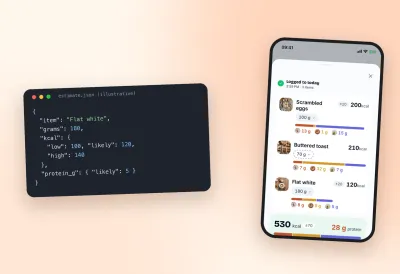
Take the estimation problem alone. People are poor judges of portions, and not in a consistent direction: in one laboratory study, adults underestimated portions of drinks and medium energy-density foods by 30 to 46 percent while overestimating portions of energy-dense foods3. A tracker that turns a user's description into a number has to decide what to do with that uncertainty. Show a single figure and users trust it more than they should; show nothing and they cannot plan. Our answer is a range for every component, but whatever you choose, it is a design decision with a long tail of consequences for totals, corrections and the numbers downstream systems consume.
Then there is the maintenance. Food databases change, new packaged products appear weekly, users write in more than one language, and mobile platforms change their permission models for camera and microphone. Each of these is small. Together they are a permanent line item for a team whose actual product is gym memberships, recipes or coaching. The honest version of the build-versus-embed calculation counts the second and third year, not only the first release.
This post describes the alternative we now offer: the logging, estimation and nutrition screens we built for our own tracker, packaged so another app can embed them under its own brand.
What's inside the SDK#
The SDK is four packages, released together at the same version:
- shared: the nutrition contracts and pure calculations (meals, components, ranges, day totals).
- client: authenticated REST and WebSocket transport plus account-scoped storage.
- design-system: the theme, typography, localisation and shared text primitives.
- nutrition-ui: the screens, components, flows, hooks, state and navigation.
They ship as TypeScript source, not pre-compiled bundles. Your bundler (Metro on React Native, Vite on the web) compiles them as part of your app, preferring the .native or .web variant of a file depending on the platform. The practical consequence is that the same packages run inside a React Native app and a React Native Web site, and your build tooling sees ordinary source it can type-check.
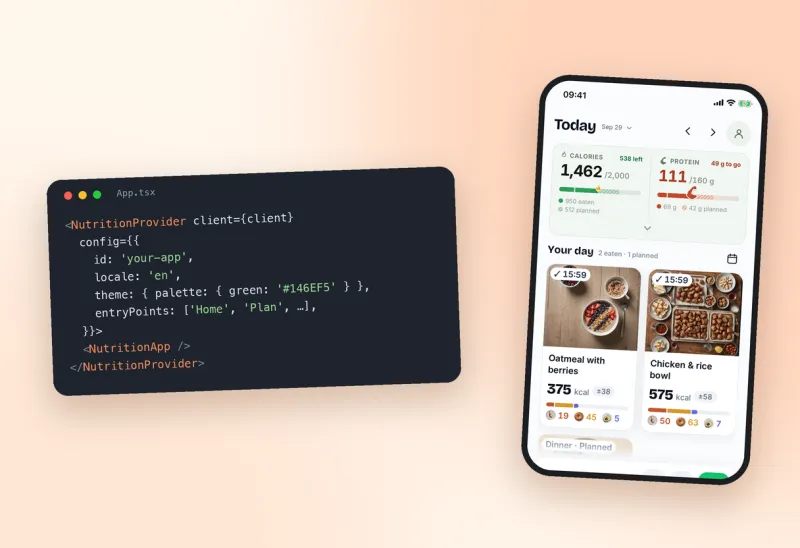
At the top level you wrap the nutrition surface in a provider and render one component:
<NutritionProvider client={client} config={{
  id: 'your-app',
  displayName: 'Your App',
  locale: 'en',
  theme: { palette: { green: '#146EF5' }, radius: { card: 16 } },
  entryPoints: ['Home', 'Plan', 'Library', 'History', 'Profile'],
  slots: { homeBefore: MembershipCard },
}}>
  <NutritionApp />
</NutritionProvider>
NutritionApp brings its own navigation, app state, toasts and safe-area handling. If you would rather place individual screens inside your existing navigation, the screens are exported separately and you supply the navigation context and two small providers yourself. Either way, the rule is that you configure the SDK rather than copying its screens into your repository; copied screens stop receiving fixes.
What your users get is the logging experience itself: describe a meal by voice, text, photo or barcode, get an estimate broken into components with calories and protein, correct any component's grams inline, plan meals ahead, and look back through history. Every estimate is a range rather than a single number, a choice we explain in why calorie estimates should be ranges.
Your brand, your login, your language#
Embedding only works if the result looks like your product. The theme is a typed provider value: a foundation palette, semantic component colours, typography variants, font families and weights, spacing, corner radii, shadows, motion, icons and assets. createTheme(overrides) merges your values over the defaults, and components read the active theme through hooks, so changing the provider restyles screens that are already mounted. Fonts belong to your app: you register the faces natively and load the web files yourself, and the SDK falls back sensibly when a chosen family cannot render a script such as Cyrillic.
Two things are deliberately not yours to change. The data colours (the colour that means calories, the colour that means protein, and the macro and status colours derived from them) are identical in every host, and the provider drops overrides of them. A user who has learned that one colour means protein should not have to relearn it inside a different app. And on calorie surfaces the SDK renders one quiet attribution line, "Nutrition tracking powered by BurnWeek", whose tap target you choose (typically your own "about calorie tracking" page covering privacy and data export). Sign-in, onboarding and the rest of your app carry only your brand.
Localisation ships for English, Estonian and Russian. You set a locale and, if you want, per-locale message overrides; translation, plural forms and number and date formatting come from shared hooks. Copy you place in your own slots remains yours to translate.
Authentication is standard OpenID Connect against your issuer. The client is built with your API and WebSocket URLs, an auth provider and a key-value store; on native you supply the platform's browser authentication session and a Keychain or Keystore adapter for tokens. No shared production API key or client secret ships inside your app, and account data is partitioned per user: signing out or switching accounts moves state and storage together, and one account's data is never replayed against another.
Events instead of integrations#
The most common follow-up request after "add calorie tracking" is "and reward people for it". A points programme, a streak badge, a discount for a closed week. The tempting implementation is to wire the tracker directly into your reward system, which works until the second reward rule arrives.
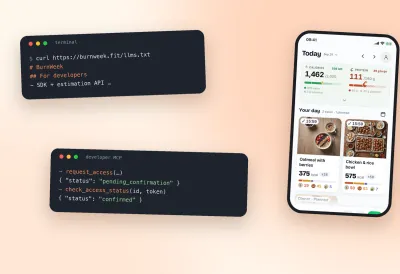
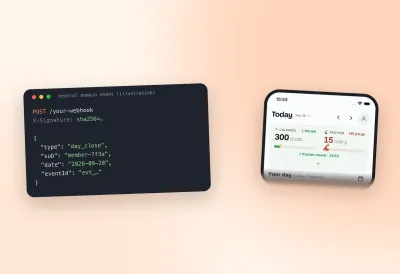
We took the opposite approach. The tracker emits neutral domain events such as meal_logged and day_close, each carrying an issuer, a subject, a date, an event id, a type and a timestamp. Your system subscribes by configuration, receives signed HTTP deliveries (an HMAC signature over the payload and a timestamp header), and decides what the event is worth. Delivery is at-least-once with a stable event id, so you deduplicate on your side. The SDK also exposes neutral host callbacks inside the app, so your UI can react without a round trip.
What this buys you is separation. Caps, once-per-day payouts, eligibility windows, coin amounts and animations live in your system, where your product team can change them without waiting on anyone. The tracker does not know what a reward is, and the same close-the-day behaviour works identically for a host with zero subscribers.
What it doesn't do (yet)#
A fair description includes the edges.
- There is no public npm package. Releases are versioned sets of four tarballs with a manifest and SHA-256 checksums, built reproducibly (the release gate packs twice and compares hashes) and verified by building an isolated example host from the tarballs alone. You install all four in one operation, or publish them to your own registry.
- Native features need native modules. Camera and barcode, microphone and audio streaming, haptics and secure storage require the corresponding modules and permission strings in your app. Adding or changing a native dependency means shipping a new binary, and hiding a feature in configuration does not remove a module your build imports.
- Upgrades are explicit. Mobile users receive SDK changes when you ship a new version of your app. Theme configuration survives upgrades as typed values; changes to exported APIs come with release notes and a semver bump.
- The screens are opinionated. You can hide entry points and features, add content slots and restyle almost everything, but the core logging flow is ours. If your product needs a fundamentally different logging interaction, an SDK is the wrong tool.
How to get access#
Access is by request while we work with a small number of integrators. Tell us what your product is, roughly how many monthly active users would see nutrition tracking, and whether you want the embedded screens, the estimation API, or both. We confirm the request by email with the person who sent it, and approval and credentials always go to a human, never to an automated client. Our case study of an embed inside a fitness marketplace shows what the integration looked like in practice.
If you are still deciding whether to build rather than embed, the most useful exercise is to write down what your version would do on the day a user logs "a bowl of soup, about this big" and later says it was actually two bowls. If the answer involves a range, a correction and a recalculated day total, you are describing most of what is in these four packages.
FAQ#
Which platforms does the SDK support?#
React Native on iOS and Android, and the web through React Native Web. The packages are TypeScript source compiled by your bundler, with platform-specific files resolved by the usual .native and .web suffixes.
Can we change the colours completely?#
You can restyle the chrome: canvas, surfaces, text, fonts, radii and component colours. The data colours for calories, protein and macros stay fixed across every host so they keep their meaning.
Do we need to run our own backend?#
No. The SDK's client talks to our API with your users' tokens from your identity provider. Your backend only needs to receive the events you subscribe to.
Is there a free tier or public package?#
Not yet. Access is by request and releases are distributed as verified tarballs rather than through a public registry.
Sources#
- Burke LE, Wang J, Sevick MA. Self-monitoring in weight loss: a systematic review of the literature. J Am Diet Assoc. 2011.
- Carter MC, Burley VJ, Nykjaer C, Cade JE. Adherence to a smartphone application for weight loss compared to website and paper diary: pilot randomized controlled trial. J Med Internet Res. 2013.
- Almiron-Roig E, Solis-Trapala I, Dodd J, Jebb SA. Estimating food portions. Influence of unit number, meal type and energy density. Appetite. 2013.
Source: BurnWeek — "Stop building your own calorie counter: one SDK for food logging", https://burnweek.fit/blog/stop-building-your-own-calorie-counter/. Licensed CC BY 4.0: free to quote or reuse with a link to this page.